
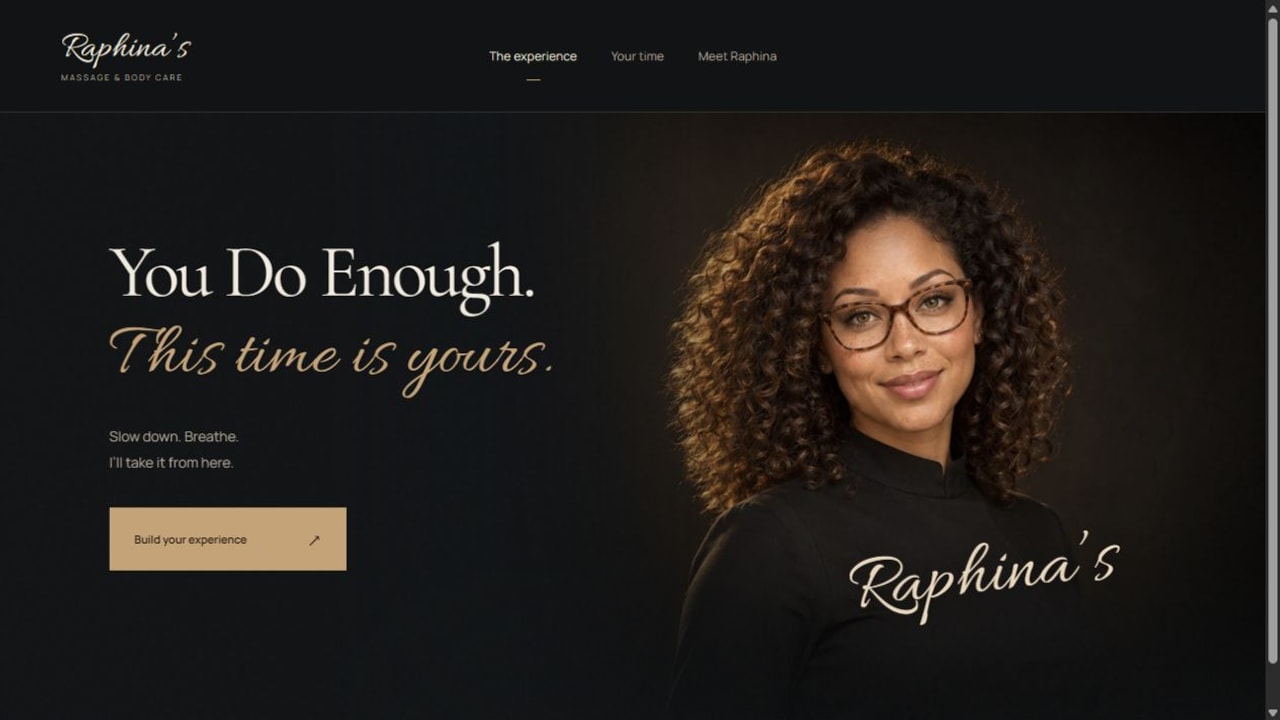
Before a visitor reads a service description, a website has already started a conversation. The photograph, the amount of space around the words, and the first button all suggest what dealing with that business might feel like. Raphina’s is a portfolio website built to demonstrate the design and interaction. For Raphina’s Massage & Body Care, I wanted that first conversation to feel personal and unhurried.
The first screen has a job
A hero section is the prominent opening area of a page. It usually combines the main message, an image and a next step. A powerful hero earns its space by helping someone understand the business and decide whether to continue.
On Raphina’s Massage & Body Care, the opening reads “You Do Enough. This time is yours.” A large portrait introduces the face of the portfolio brand. The supporting copy is short, and the main button says “Build your experience.” Each element points toward the same idea: this visit is about the person making the appointment.
That is a useful starting point for web design in the Inland Empire. A business owner in Beaumont or Riverside does not need the same visual style as Raphina’s. They need an opening that makes sense for their own customers. A contractor may need to establish the type of work and service area immediately. A staffing agency may need separate paths for employers and candidates.
Why the portrait, color and space work together
The charcoal background gives the warm gold button and light headline room to stand out. Raphina’s portrait carries much of the visual weight, while the text occupies a quieter area beside it. There is a deliberate reading order: recognize the person, understand the message, find the next action.
The headline pairs a restrained serif with a more expressive line of script. That contrast gives the opening personality. It also creates a responsibility for the designer: decorative type must remain readable at the sizes people actually use. On smaller screens, line breaks, image cropping and button placement need their own attention.
Space is doing work here. Filling every available corner with badges, paragraphs and competing buttons would change the tone. I use the available space to make the first decision easier.
A good button leads somewhere useful
The most revealing part of a hero is what happens after someone uses it. Raphina’s button opens an experience builder where visitors can choose an appointment length and express preferences about the focus of their time. A summary shows the selected duration and price before the visitor moves to an appointment request.
The wording at the end matters: the requested time is a preference, and the business would contact the visitor to confirm. The interface does not present an unconfirmed request as a reserved appointment. This is a small detail with a real business consequence: the website and the service provider need to describe the same next step.
A local business website can follow this principle without a custom builder. A quote form can ask for the information needed to prepare a useful response. A restaurant can lead directly to a readable menu. A professional service can explain what a first conversation involves.
The same care belongs on a phone—and in the page text
For an Inland Empire customer comparing businesses on a phone, the design needs to remain clear when the available width changes. I would check the headline, the portrait crop, the navigation, the main action and the form as one connected journey. A desktop screenshot cannot establish that all of those work well on a phone.
Important information should also exist as meaningful page text. The business name, service description and navigation should not depend entirely on text baked into a photograph. Descriptive headings and links help visitors understand the page and give search engines useful context.
Local relevance comes from accurate information. If a business serves Banning, Beaumont or Redlands, the site should explain the actual service area and how customers make contact. A list of city names cannot substitute for a useful service page.
A five-minute hero review for your own website
- Read only the first screen. Can a new visitor identify the business and understand the offer?
- Find the main action. Does its label explain what happens next?
- Follow that action. Does the next screen deliver what the button promised?
- Try a narrow screen and keyboard navigation. Are the words, controls and focus states still usable?
- Check the claims. Are locations, availability, prices and customer evidence accurate?
This breakdown explains design decisions, not measured conversion results. There is no traffic or booking uplift claim attached to the example. Those results require a baseline and real measurement after launch.
If you want a website that feels like your business and gives visitors a clearer next step, explore The Data Architect’s web design services or tell me what customers should be able to do on your site.