
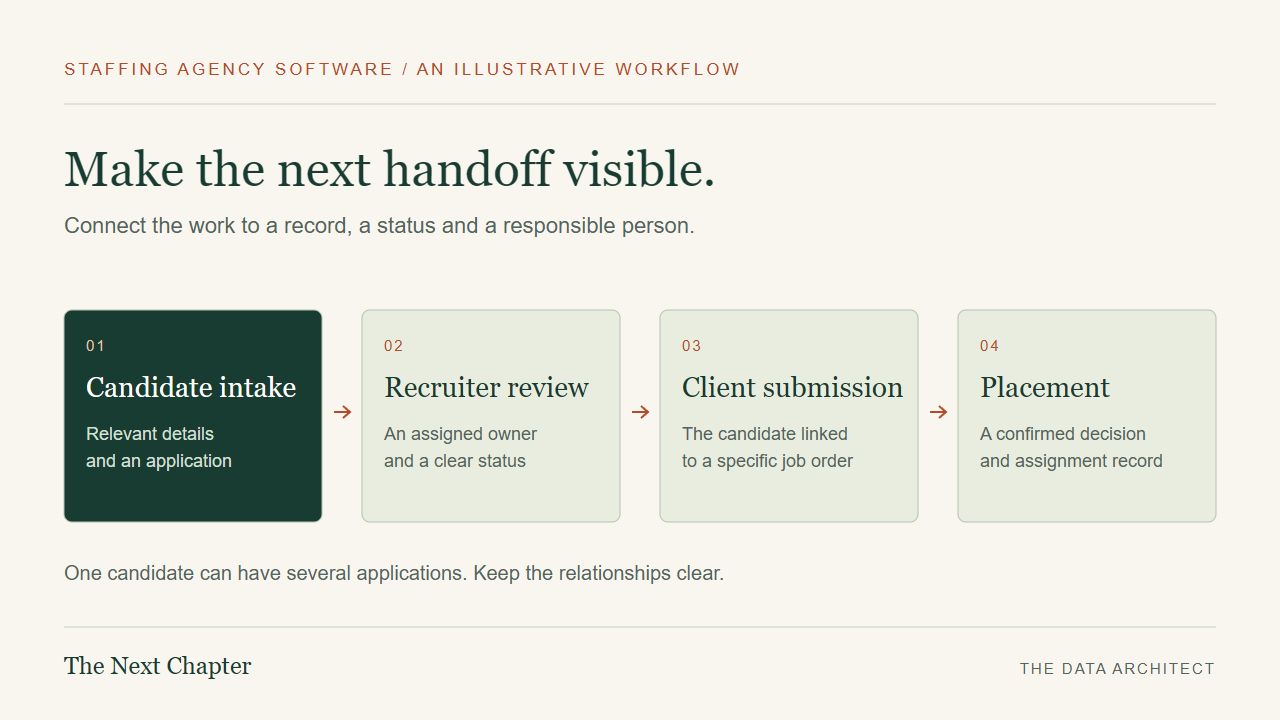
A staffing agency can receive an application in one place, discuss a job order somewhere else and keep the latest availability in a recruiter’s notes. The difficult moment arrives when another person needs to pick up the work. Good staffing agency software makes that handoff understandable.
The website serves two different audiences
Job seekers want to understand the opportunity, provide their information and know what happens next. Employers want to explain a staffing need and speak to someone who can help. Those journeys deserve different language and different forms.
For an illustrative staffing agency serving Riverside and San Bernardino, the public website might offer a clear “Apply for work” route and a separate “Request staff” route. The first could collect an application and resume. The second could ask about the role, location, schedule and best contact person.
This is where web design supports the operation. A polished homepage matters, but the quality of the information reaching the recruiter matters too. Ask for what is needed at that stage and explain the next step clearly.
A candidate is not the same thing as an application
One candidate may apply for several roles. One employer may have several open job orders. A placement connects a particular candidate to a particular assignment. Keeping those distinctions clear makes it easier to maintain useful history without overwriting earlier work.
| Record | What it represents |
|---|---|
| Candidate | The person’s contact record, relevant qualifications and current availability. |
| Job order | The client’s specific staffing requirement, location and agreed details. |
| Application or submission | A candidate being considered for a particular opportunity. |
| Placement | The assignment that results from a confirmed decision. |
| Activity | A call, note, status change or follow-up linked to the relevant work. |
A shared status needs a shared definition. If one recruiter uses “contacted” to mean a voicemail and another uses it to mean a completed conversation, the dashboard cannot tell a consistent story. Establish those meanings before adding automation.
Show who owns the next action
A useful staffing screen should make the next responsibility visible: which applications are waiting for review, who is handling a client request and which follow-ups are overdue. A single crowded spreadsheet often makes those questions harder as more people contribute.
An agency coordinating jobs in Ontario and Fontana might need location and availability filters. A specialist recruiter in Redlands might need a different set of job-related qualifications. The appropriate fields should come from the agency’s actual process, not assumptions about every business in a city.
Automation can help route tasks or flag missing information. Hiring and placement decisions still need accountable human review. A record should make it possible to understand what changed and who made the change.
A practical starting point: Data Architect Hire
Data Architect Hire is a focused example from my own work. Businesses can create a hiring page, receive applications and resumes, review submissions, keep notes and track progress through defined statuses. They contact applicants themselves.
That is useful application intake and tracking. A complete staffing agency system can require substantially more: client job orders, assignment management, credential workflows, timesheets, payroll or billing integrations and separate access for different teams. Those capabilities should be scoped as additional development rather than assumed to exist in the hiring tool.
The distinction helps a business choose a sensible starting point. If intake is the immediate problem, solve intake. If the challenge is coordinating placements across recruiters, plan the records and permissions needed for that work.
Candidate information needs deliberate handling
Access should follow responsibilities. A public hiring page should not expose private resumes. A client-facing view should not automatically reveal internal recruiter notes. An administrator should be able to manage access when someone’s role changes.
Retention, exports, backups and deletion also belong in the specification. Agree on how long information is kept, who can export it and how recovery will be tested. Business-specific privacy and employment requirements need to be reviewed as part of the project; a dashboard alone does not establish compliance.
Choose a pilot that can be measured
Start with a limited path such as application received, recruiter assigned, review recorded and follow-up completed. Use sample records to test the roles and edge cases. Then compare the pilot with a baseline: missing information, duplicate entry, time to review and unassigned follow-ups.
For Inland Empire staffing businesses, a well-defined pilot can reveal whether an existing product, an integration or custom staffing software development is the better fit. The useful first conversation is about the work getting stuck.
Tell The Data Architect how a candidate moves through your agency today. We can map the public website, the internal handoffs and the business software needed to support the people doing the work.