
A website needs an everyday owner
A business website should look carefully designed on launch day and remain useful when the business changes. The editor behind it determines whether updating a service, replacing an image or improving a call to action feels manageable.
The Data Architect CMS pairs a custom public website with an administration workspace built around recurring business tasks. Its visual page editor is one part of that system. The same workspace includes inquiry handling, product and payment administration, and tools management.
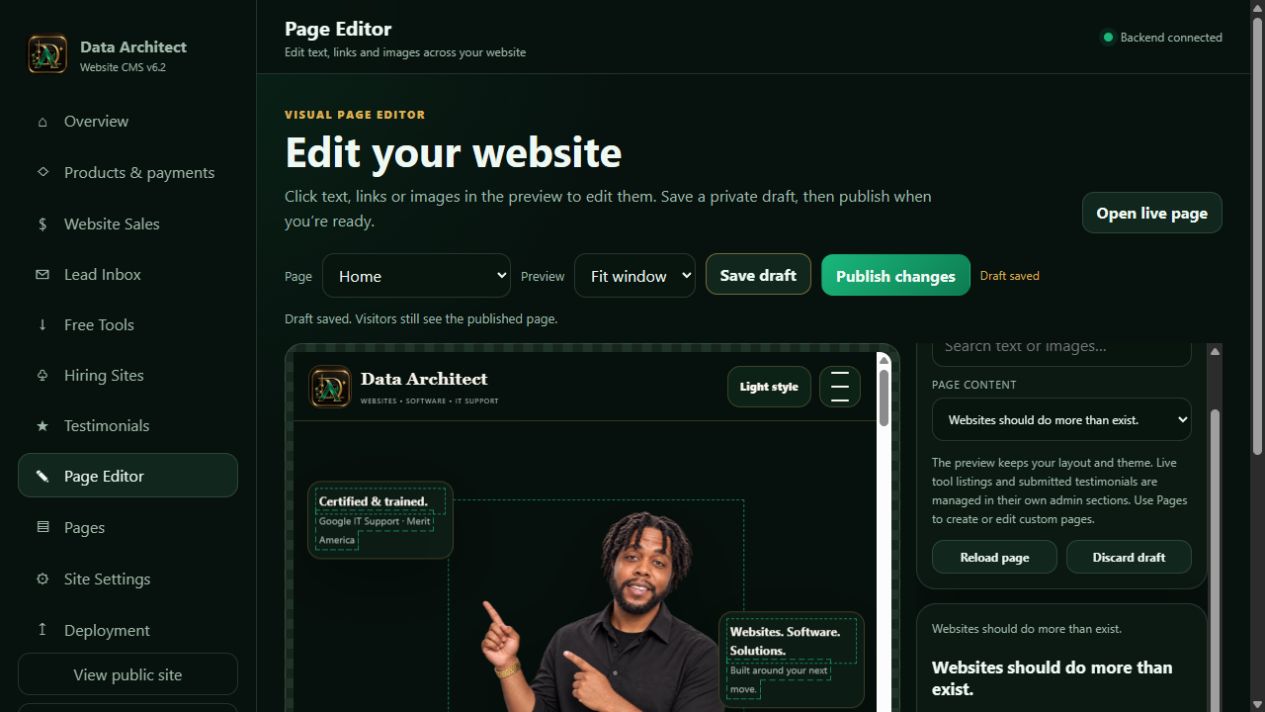
This walkthrough uses our actual CMS and our own live website. The editor screenshot shows an isolated demonstration draft; it is not a claim that a private client’s site or records are being displayed.
1. Start with the page, then the exact piece of content
Choose a page in the editor. The available editing model identifies the text, links and images intended for routine updates. Click a supported element in the page preview or find it in the field list. Search is useful when a page contains several sections with similar text.
This is a controlled visual editor for a custom website. It preserves the designed layout while exposing the content that an owner needs to maintain. New page structures, application features and significant layout changes remain development work. That boundary helps an owner improve the site without accidentally dismantling its design.
 View screenshot ↗
2. Separate a draft from the public version
Update the selected field and inspect it in context. A stronger headline may need less text. A new image may need a different crop. A link label should describe the next action, and its destination needs to match that promise.
Save draft keeps work available for review while the current published version remains in place. Publishing is a separate, deliberate action. The editor also provides a way to reset an item or discard a draft when a proposed change does not improve the page.
Actual editor endpoint · shortened example · authenticated admin request
PATCH /api/admin/page-editor/pages/{page-id}
Content-Type: application/json

{
  "action": "save",
  "revision": 7,
  "values": { "{editable-field-id}": "A clearer headline" }
}

// Publishing is a separate request:
{ "action": "publish", "revision": 8 }
The identifiers and revision numbers above are illustrative. The editor loads the current field definitions and revision from the server. A revision check helps prevent a stale editing session from silently overwriting newer work. Authentication belongs on the server; hiding a button is not an access-control system.
3. Review the experience, not only the sentence
The editor offers fit-to-window and phone previews. Check the headline, supporting copy, imagery and next action as one composition. On a narrow screen, confirm that the most useful information arrives before secondary decoration and that a call to action is easy to recognize.
Previewing a layout is a useful review step, but launch checks still need the actual public page. Open the page at desktop, tablet and phone widths. Follow the navigation, use the form labels, check keyboard focus, and look for content that runs outside the screen.
For an Inland Empire service business, this also means making the service area clear. A visitor in Beaumont or Banning should understand the same offering as a visitor in Redlands, Riverside or Fontana, without reading a page that repeats city names at the expense of useful information.
4. Publish and verify the public result
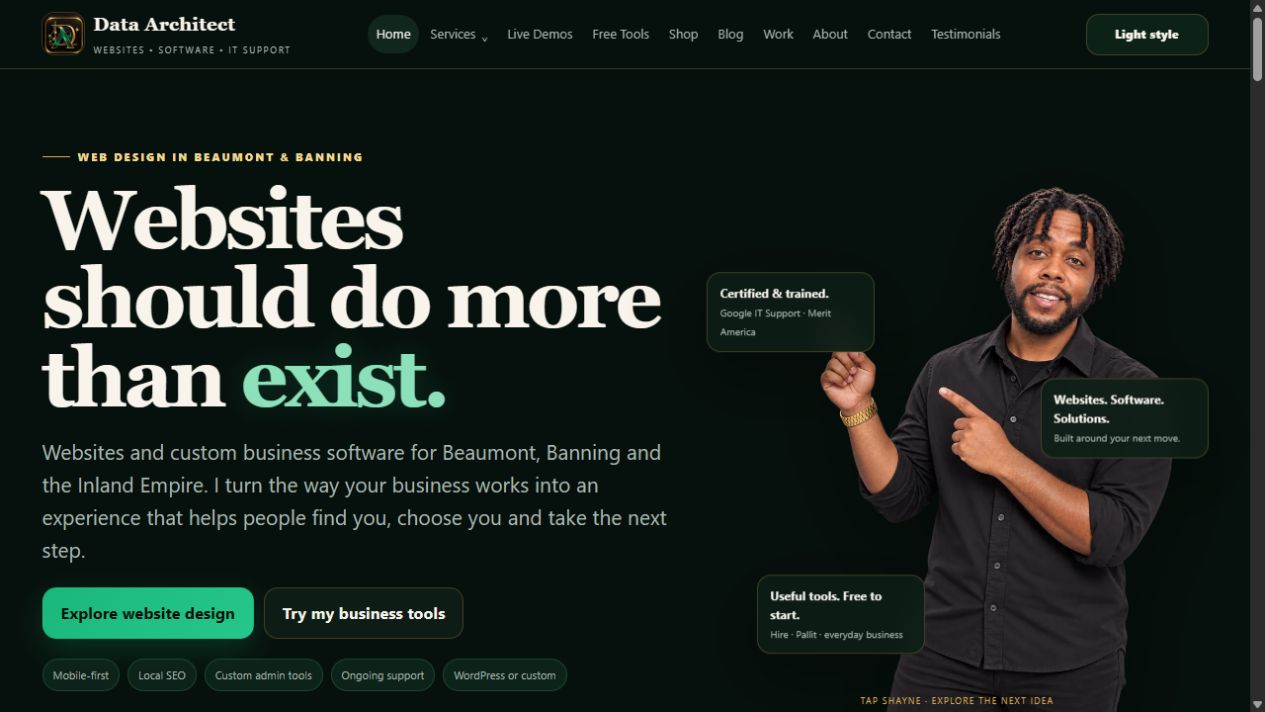
Once the change is ready, publish it and inspect the public URL. The CMS serves the published content to visitors while keeping drafts separate. For code or structural releases, the deployment process also checks a preview before updating production.
Content publication and code deployment are related but different operations. A routine headline change can use the CMS. A new integration, template or application screen needs development, testing and a controlled release. Both should finish with a check of what a visitor actually sees.
 View screenshot ↗
Our separate Raphael’s Massage & Body Care design breakdown shows another visual direction: a distinctive hero, service presentation and a clear next action. It is a design example, not evidence that that separate site runs on this CMS.
5. Connect the website to the work after the click
The useful endpoint is not a screenshot. A visitor should be able to find the service, submit the right information and receive a clear next step. The owner should be able to find the resulting record, understand it and follow through.
Our company inquiry captures the organization, team size, locations, technology and requested outcome. The private inbox keeps the structured answers with notes and a status. Email previews help the owner check a reply before sending it. Product administration keeps an agreed scope and payment plan connected to the relevant order.
These modules share a business purpose, but they do not automatically make every form a contract or every inquiry a paid order. Discovery and scope agreement remain explicit steps. That distinction is part of building software a business can trust.
What a useful CMS handoff should include
- Editing boundaries: which fields the owner can change, and which changes need development.
- Publication steps: how to save a draft, review it and publish, with a public-page check afterward.
- Access and ownership: who maintains the website, hosting, domains and integration accounts.
- Operating workflow: who reviews inquiries, follows up, manages content and checks failed deliveries.
- Recovery and maintenance: the agreed backup, restoration, update and ongoing support responsibilities.
A custom CMS is valuable when these tasks fit the business. The design, data model and maintenance plan should be decided together. For a company in Yucaipa, San Bernardino or Rancho Cucamonga, the objective is practical: keep the site current and keep the work moving.
Explore the full product showcase, continue into the inquiry and payment walkthrough, or discuss the editing workflow your team needs.