
Computer diagnosis
Slow systems, startup issues, device setup and practical upgrade decisions. Start with the symptom and protect the information before changing the machine.
Computers. Networks. Business systems.
I’m Shayne Brown, founder of The Data Architect and a Google IT Support Professional Certificate holder. I help businesses diagnose technical problems, set up computers and networks, build ticketing workflows and establish a practical IT function—with remote support and on-site visits by arrangement.
Based in the Beaumont–Banning area · Scope, availability and pricing confirmed before work
A working website is one part of a business’s technology. The computers, network, accounts and software behind it need attention too. Support begins with understanding the impact and agreeing on the work.
Slow systems, startup issues, device setup and practical upgrade decisions. Start with the symptom and protect the information before changing the machine.
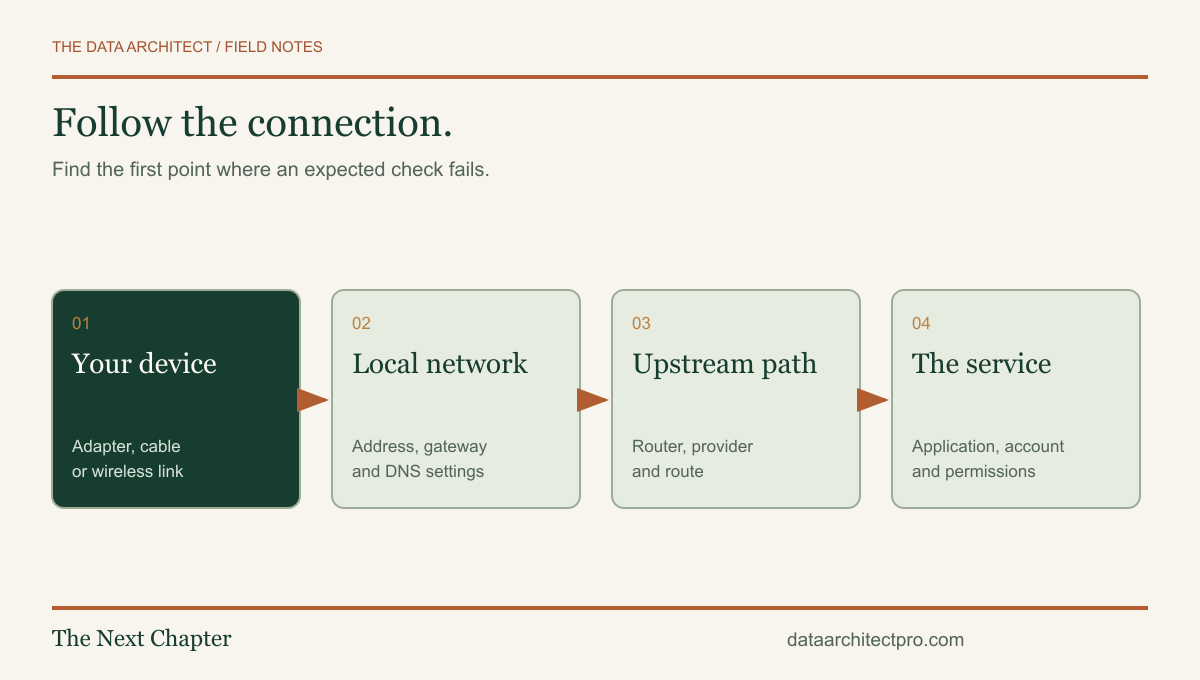
Work through cabling, wireless coverage, addressing, DHCP, DNS and routing. Separate a device issue from a provider, network or application problem.
Review account access, shared resources, software support and the connections between a website and the tools your staff use.
Identify essential data, review backup scope and plan a restore test. Document what can be recovered and the people responsible.
Discuss a parts list, compatibility, first-boot issues or a workstation setup. Check the hardware against the actual workload.
Receive an explanation of findings, changes made, checks performed and recommended next steps. Specialist work is scoped or referred appropriately.
Google IT Support Professional Certificate, completed November 25, 2023. The program covers technical support, networking, operating systems, system administration and IT security fundamentals. I am also a Merit America graduate.
View Shayne Brown’s verified Coursera credential ↗Tell me what is failing, how many people or devices are affected, and what changed. Approximate counts are enough.
We review access, urgency, backups and whether remote help or a visit is appropriate. You receive the proposed scope and pricing before work begins.
Changes follow the evidence and an agreed recovery path. We retest the task that was failing and explain what remains unresolved.
Keep the findings, settings that changed and next actions. Ongoing maintenance is arranged separately when needed.
This inquiry form is not a monitored emergency service or a guaranteed response-time agreement. Do not include passwords, access tokens, recovery codes or sensitive customer records.
Computers and LAN/WAN networks. Access and onboarding. Ticketing, remote support, integrations and continuous improvement.
I help companies plan and build the IT processes behind their daily work: establish the environment, make ownership clear, capture support requests, diagnose issues, verify changes and leave useful documentation. The scope can be a specific improvement or a phased setup for a company’s IT function.
Workstation setup, operating systems, drivers, updates, approved applications, device records and practical user handoff.
Review switching, Wi-Fi, addressing, DHCP, DNS, routing, network segmentation, firewall rules and connections between locations. Scope implementation and verification around your actual equipment and access.
Use authorized remote sessions for diagnosis and agreed changes. Add reviewed AI summaries, knowledge assistance and integrations that keep actions accountable.
I have experience with ServiceNow, Jira Service Management, Zendesk, Freshservice and ConnectWise. I can help review existing workflows, configure the agreed improvements and connect business systems. I also design and build custom modern ticketing systems around a company’s own process.
A complete help desk connects requesters, devices, priorities, technicians, approvals, communication and reporting. Read how each platform works, then compare it with a custom implementation. Platform-specific work is scoped to your edition, configuration and requirements.
Understand incidents, requests, ownership and change handoffs in ServiceNow ITSM—and the decisions that make a service desk useful to a real business.
Follow the workflow ↗PLATFORM WORKFLOW GUIDEJira Service ManagementA practical guide to Jira Service Management request types, queues, workflows and SLA goals, with an implementation example for an Inland Empire business.
Follow the workflow ↗PLATFORM WORKFLOW GUIDEZendeskUnderstand Zendesk ticket statuses, requester communication and support handoffs, including the difference between a solved ticket and a closed one.
Follow the workflow ↗PLATFORM WORKFLOW GUIDEFreshserviceFollow an employee setup request through a Freshservice service catalog, approvals, fulfillment and verification, with practical advice for business IT teams.
Follow the workflow ↗PLATFORM WORKFLOW GUIDEConnectWise PSAUnderstand ConnectWise PSA service boards, statuses and the handoff from technical work to reporting and business administration.
Follow the workflow ↗Employee portal, structured intake, role-based queues, internal notes, requester updates, asset relationships, approval steps, audit history and operational reporting—designed as one connected workflow.
See the custom ticketing pipeline from intake to resolution ↗Based in the Beaumont–Banning area, The Data Architect supports businesses across Riverside County and San Bernardino County. Remote support is available by agreement; on-site visits, travel and the required work are arranged individually.
The San Gorgonio Pass is home base. Discuss workstation installations, office connectivity, business applications and a clear support process.
Remote assistance, device onboarding, Wi-Fi troubleshooting and help desk workflows for teams using shared business systems.
Support for computers, LAN/WAN requirements, account access and the ticketing process that connects technical issues to accountable follow-up.
Plan a new office setup, improve an existing network or connect support requests with the software your business depends on.
Review multi-user environments, device ownership, remote access and the handoffs between internal staff and outside providers.
Bring workstation, network and business-software needs into one defined scope, with implementation checks and a useful handoff.
Build a support process for growing teams, new locations and repeatable employee setup. Lake Elsinore, Wildomar and Canyon Lake are also included.
Remote inquiries are welcome from Victorville, Hesperia, Apple Valley, Palm Springs, Cathedral City, Palm Desert, Indio and surrounding communities. On-site feasibility and travel are confirmed individually.
Diagnose network problems by separating Wi-Fi, DHCP, DNS, routing and application failures. A practical guide for Inland Empire small businesses.
Read the guide ↗IT SUPPORT / COMPUTERS & SYSTEMSBefore You Buy a New Computer, Find Out What Is Actually SlowSeparate storage, memory, startup, heat and network problems before replacing a slow computer. Practical IT support guidance for Inland Empire businesses.
Read the guide ↗THE WORKBENCH / AN ILLUSTRATED GUIDEHow to Build a PC: A Step-by-Step Guide to a Computer You UnderstandBuild a desktop PC with 12 illustrated steps covering compatibility, CPU, RAM, storage, cooling, power, first boot and testing. Includes a planning checklist.
Read the guide ↗IT SUPPORT / BACKUP & RECOVERYYour Backup Is Only Useful If You Can Restore the WorkPlan backups around real business work, test recovery and separate sync from protection. A practical checklist for Inland Empire small businesses.
Read the guide ↗TECHNOLOGY BRIEF / OCTOBER 2026Office 2021 Support Has Ended. Here Is the Business Decision Behind the Update.Office 2021 reached end of support in October 2026. Review versions, files, add-ins and migration choices before changing your business’s working setup.
Read the guide ↗TECHNOLOGY BRIEF / OCTOBER 2026A New NIST Resource Helps Small Businesses Find Cybersecurity SupportNIST highlighted a new cybersecurity support finder in October 2026. Here is how Inland Empire businesses can use it and prepare for a useful support conversation.
Read the guide ↗A few details about your team, technology and priorities help me prepare a useful first response.