
You can often feel the difference between a carefully designed website and an ordinary theme before you can explain it. The headline is easy to read. The images belong. The next action is obvious. Nothing seems to be fighting for attention.
That feeling comes from decisions that work together. A premium theme supplies a starting point, but the business still needs its own visual identity, content and interactions. A familiar layout can feel distinctive when those decisions are specific. An elaborate layout can feel generic when they are not.
1. Decide what the business should feel like.
Start with the service, the audience and the moment someone arrives. A property management company needs to communicate care, organization and confidence. A massage and body-care practice may need warmth, calm and a more personal introduction. The same colors, photographs and headline treatment will not serve both equally well.
Choose a few clear attributes, then translate them into visible decisions. “Warm and professional” might mean an ivory background, readable body text, generous spacing and natural photography. “Expressive and personal” might use a striking portrait, a stronger headline and a more individual voice.
A useful question during review is: if the logo disappeared, would this page still feel like this business? The answer should come from more than the accent color.
2. Let typography establish the hierarchy.
A display typeface can create character, but every line still has a job. The main heading introduces the promise. Supporting text explains it. Labels help people navigate. Body text carries the detail. Give those levels distinct sizes, weights and spacing.
Use a restrained font palette. A characterful serif can pair well with a quiet, readable sans serif. Check the actual words at mobile sizes: an elegant desktop headline may become a tall stack of awkward fragments on a phone. Rewrite or resize it until the line breaks feel intentional.
Thin lettering, tiny gold text and widely spaced capitals can look attractive in a large mockup yet become difficult to read in use. Test contrast and readability at the size people will actually see. The same principle applies to a shared-link thumbnail: the company name and subject need to survive a small preview.
3. Build rhythm with spacing and hierarchy.
Whitespace gives important elements room to be understood. The space between a heading and its paragraph should suggest that they belong together. The space before the next section should signal a new thought. Choose a consistent spacing system so these relationships hold across pages.
Premium design also needs variation. Follow a large visual moment with a quieter section. Pair an image with a concise explanation, then let a detailed comparison or a useful gallery take more room. If every section repeats the same three cards and centered heading, the business can feel interchangeable.
4. Choose images that explain something.
Photography should help a visitor understand the people, service, product or place. An exterior property photo answers a different question from a kitchen photograph. A portrait can establish the person behind a personal service. Generic decorative imagery rarely supplies the same context.
Our Alderwick and Raphina’s builds illustrate different visual directions. Alderwick emphasizes homes, warm space and a measured navy-and-gold palette. Raphina’s uses a more personal composition with a prominent portrait and a darker background. Both can feel polished without sharing the same identity.
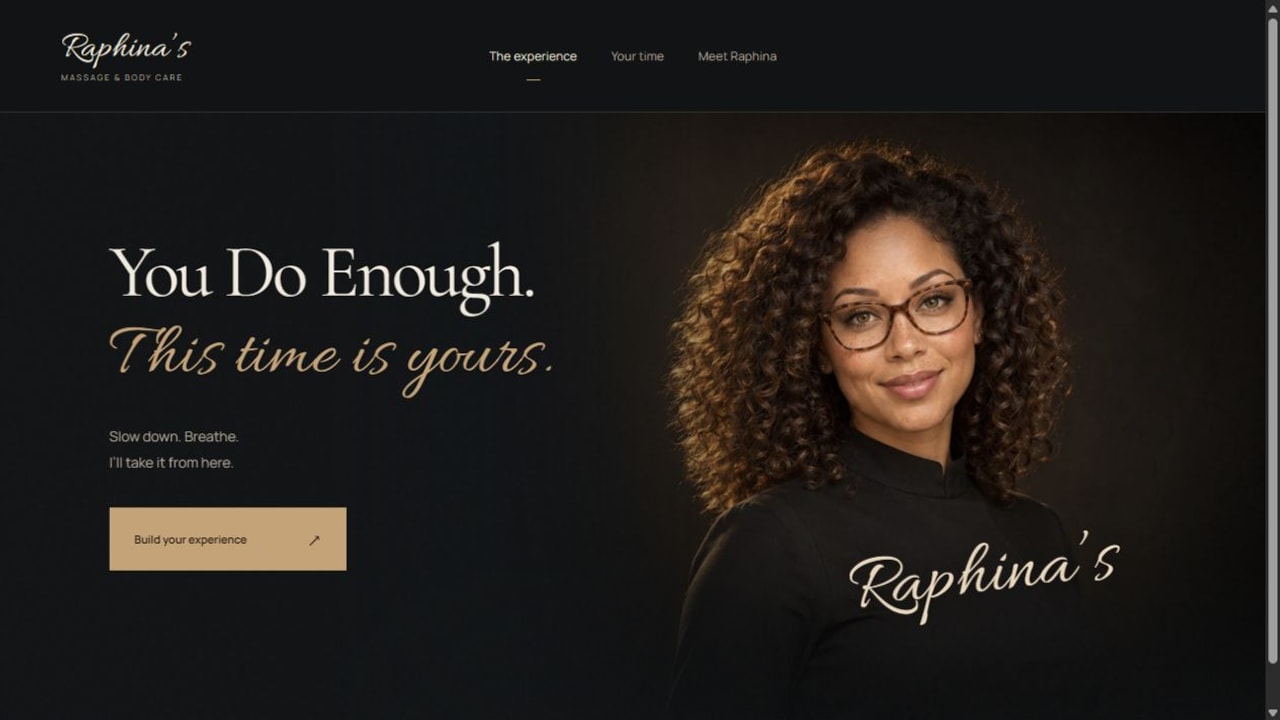
Image shape is part of the composition. An arch or oval may suit a warm editorial introduction; a wide landscape crop may be better for a home gallery. Choose the shape for the content, and preserve the important part of the image at each screen size. A stylish frame cannot rescue a blurry source.
5. Make motion feel deliberate.
A gentle reveal can establish pace. A fading gallery transition can connect two images. A mobile menu that opens smoothly can feel more finished than one that abruptly covers the screen. Each movement should support orientation or feedback.
Keep the experience responsive. A visitor should not have to wait through a long transition after every click. Gallery controls should remain usable, touch gestures should behave predictably, and interactive elements should work with a keyboard. Provide a reduced-motion experience for people who request it.
The W3C’s guidance on interaction animation explains why nonessential motion needs user control. A calm, usable experience is part of the quality standard.
6. Carry the quality into mobile and the working features.
Mobile design needs its own composition. A desktop search bar may become a stacked form. A full navigation row becomes a compact menu. The important action should remain easy to find while leaving enough room for the content.
Open the menu, tap outside it, return to the page, browse a gallery and complete a form. Check empty fields, validation messages, loading states and success messages. A polished homepage loses credibility when a form gives no confirmation or an image covers its own controls.
Performance belongs in this review too. Use images sized for their display, load secondary media when needed and avoid making every page depend on large decorative effects. Test the real page on a phone and ordinary connection conditions, not only a large development monitor.
Content editing also matters. The owner should be able to replace an image, update a service or change a listing while preserving the visual structure. Our custom CMS walkthrough shows how the editing experience connects to the live website.
7. Choose a designer by the complete experience.
If you are searching for a web designer near you in Beaumont, Banning or elsewhere in the Inland Empire, look beyond the first screenshot. Ask to browse a working site on your phone. Look for a clear identity, readable information, useful interactions and a sensible way to maintain the content.
Discuss what makes your business different: the customers you serve, the work you do well and the details that help someone choose you. Those answers should shape the website. A list of fashionable effects is not a design brief.
At The Data Architect, web design and software are connected. The goal is a distinctive public experience supported by the forms, content management and business workflows the company needs. You can explore our website portfolio, compare the available services and use the checklist below to prepare a project conversation.
THE CONVERSATION CONTINUES
Your perspective matters.
Rate this article or add a question, experience or idea to the discussion.
Join the discussion
No account or email address is required. A browser cookie remembers your rating. About reader feedback and privacy
Reader discussion
Comments appear here after review.