
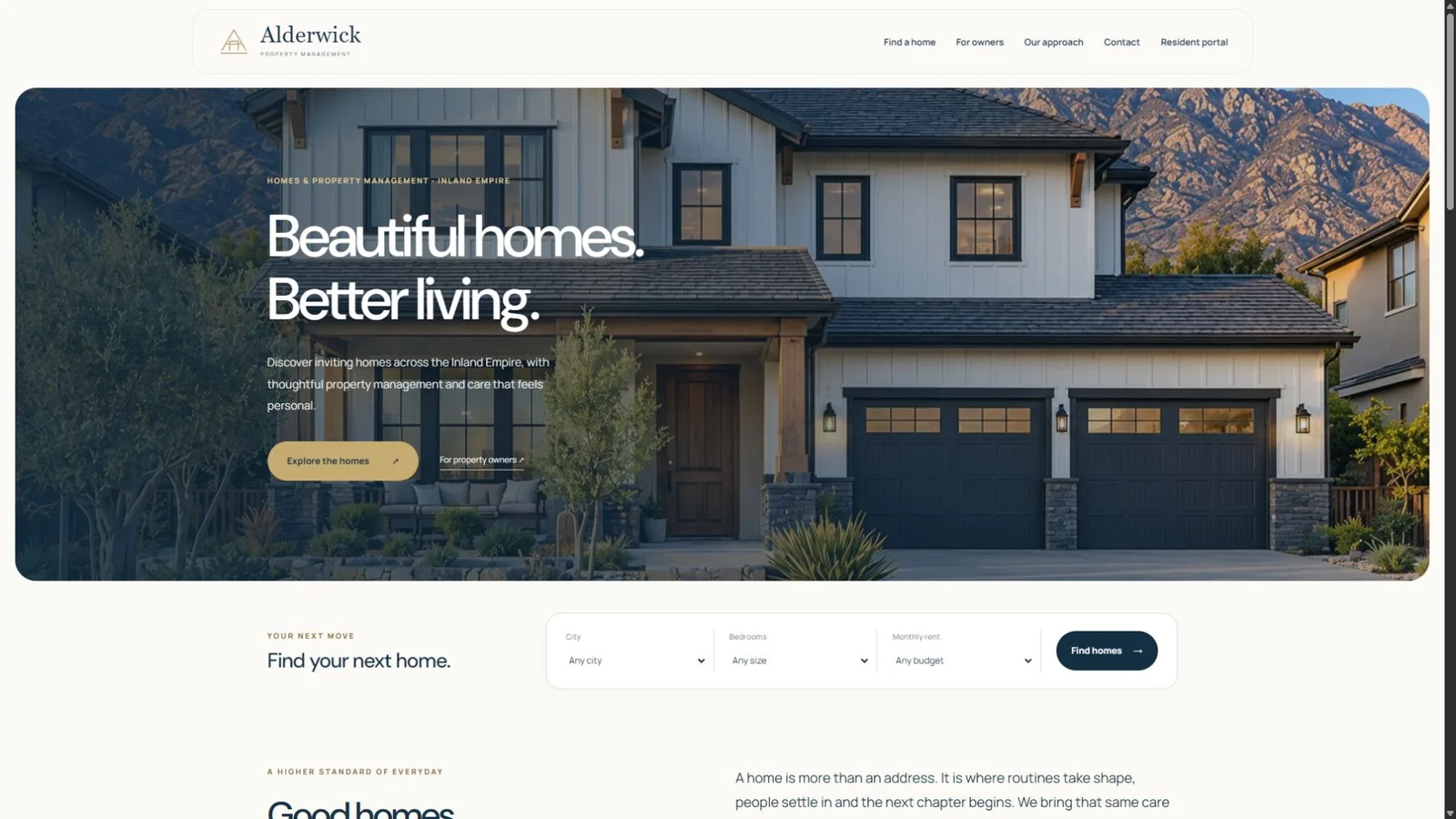
A property management website has several jobs at once. It introduces the company, helps someone find a home, gives property owners a reason to inquire, and supports people who already live in a managed property.
When those jobs are designed together, the website becomes part of daily operations. A listing leads to a relevant inquiry. An approved resident has a clear place to find documents and payment information. The manager can update the property without rebuilding a page.
Our Alderwick website makes this approach visible. This project breakdown explains the public experience and the operational requirements behind it, so a property manager can evaluate the whole system.
1. Establish a clear, confident first impression.
A visitor should quickly understand what the company manages, where it operates and how to browse available homes. A resident returning to pay rent has a different task, so the resident portal needs a recognizable place in the navigation.
For Alderwick, warm ivory, navy and restrained gold establish the visual direction. Large home photography carries the story. The hero changes gently, and visitors can move through its images themselves. On a phone, the navigation and search need their own comfortable space; overlapping a complicated search form on a small image makes both harder to use.
The visual treatment should carry into the details: readable buttons, consistent spacing, clear form labels and a mobile menu that closes predictably. These choices make the company easier to deal with before anyone sends a message.
2. Let people narrow the search before asking them to click.
A property card should answer the first questions: where is it, how much is the rent, how many bedrooms and bathrooms are there, and is it available? An exterior image helps someone recognize the home. Additional photographs let them get a better sense of it without losing their place in the results.
The Alderwick collection shows six property presentations across Redlands, Loma Linda, Yucaipa, Riverside, Rancho Cucamonga and Highland. Its city filter demonstrates how a manager can separate locations within one portfolio. Availability and coming-soon states belong to the individual property, and an open house needs a date and time.
Good property management website design makes this path understandable on a phone. A filter should explain an empty result and make it easy to start again. A prospective resident should never need to guess whether a blank grid means there are no homes or the website has stopped working.
3. Give each home a complete, organized listing.
A listing deserves one main gallery image, clear previous and next controls, and thumbnails that help the visitor choose a room. Exterior, living area, kitchen, bedrooms, bathrooms and outdoor space each answer a different question. Supply original photographs with enough resolution for desktop viewing, then deliver appropriately sized files to smaller screens.
For an occupied property or a coming-soon listing, the manager should control which images and location details are public. A map should use the actual property address or the deliberately chosen approximate location. A 3D tour belongs beside the gallery when a real tour is available.
- Space: square footage, bedrooms, primary suites, bathrooms and number of stories.
- Daily living: laundry, heating and cooling, kitchen features, closets and outdoor space.
- Parking: garage spaces and any additional parking arrangements.
- Rental terms: monthly rent, deposit, availability, lease length and the applicable pet policy.
Alderwick includes fields for these details because “beautiful home” is not enough information to make a decision. The manager should be able to maintain the facts in the property editor and have the public listing reflect them.
4. Carry the property into the inquiry.
Someone who opens a particular home should not have to retype its name, address and rent. Show that selection above the inquiry form and attach the property identifier to the request. The manager then receives the context along with the person’s contact information and question.
This is also where wording matters. “Ask about this home” describes an inquiry. An application is a separate process with its own requirements. The interface should make the next step clear instead of implying that sending a message reserves the property or approves an applicant.
Behind the page, the server should look up the selected property itself. Browser-submitted text should not become the authority for a rent amount or availability. That connection keeps the public presentation and the management record aligned.
5. Plan the ongoing resident relationship.
After move-in, a resident needs a private account associated with the correct property. Useful portal functions include access to assigned documents, a way to return requested files, maintenance requests and a clear payment history.
Our property-management system includes dedicated resident and management flows. For a client launch, the actual company’s residents, agreements, permissions and payment setup must be connected and checked. Public portfolio listings do not establish that a company is collecting live rent through the site.
A payment flow should retrieve the resident’s current amount from the backend, open secure checkout, and record payment only after the payment provider confirms it. Cancellation, failed payments, receipts and duplicate notifications all need handling. Recurring billing and any payment fees need explicit configuration and review for that business; they should never be assumed from a visual preview.
6. Make the owner’s work straightforward.
The owner should see property language in the admin area: homes, availability, residents, documents and maintenance. Reusing a strong content-management foundation is useful, but the labels and fields must fit the business. A rental home should not inherit unrelated restaurant or retail options.
A practical handover walks the manager through adding a property, changing its status, reordering photographs, assigning a resident, sharing a document and finding a payment record. Staff permissions should reflect who needs to do each task. Private resident documents should remain separate from public listing assets.
This is the connection between business web services and custom business software: a polished website with an operating process the team can actually use.
7. Evaluate the complete experience before launch.
Browse the site on a phone, filter by city, open a home, move through its gallery and follow the inquiry path. Then review the management side with the people who will maintain it. Confirm who supplies listing photography, who updates availability, how resident access is approved and where support requests go.
For property managers in Beaumont, Banning and the wider Inland Empire, the right project scope depends on the portfolio and the daily work. A listing website and a resident-management system are different commitments. Defining those responsibilities at the start makes the finished website more useful and the ongoing service easier to understand.
THE CONVERSATION CONTINUES
Your perspective matters.
Rate this article or add a question, experience or idea to the discussion.
Join the discussion
No account or email address is required. A browser cookie remembers your rating. About reader feedback and privacy
Reader discussion
Comments appear here after review.