
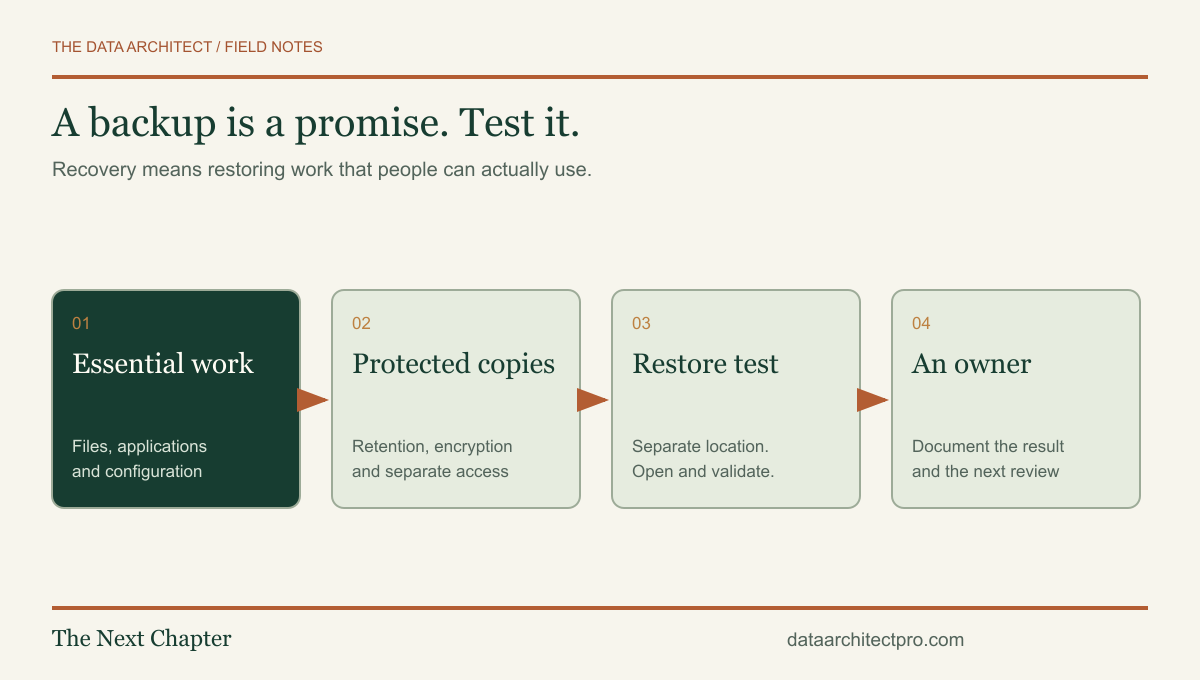
A green backup notification can feel reassuring. The better question is whether your business could recover the right information, on a usable device, in time to keep working. That requires a recovery plan as well as a copy of the files.
Start with the work that cannot disappear
List the information needed to operate: customer records, invoices, shared documents, project files, account access and the configuration of important systems. Include data in cloud applications. Ask where the authoritative copy lives and who is responsible for it.
For a Banning service business, tomorrow’s appointments may matter more immediately than an old marketing archive. A Beaumont office might need accounting records and shared templates before staff can resume normal work. These are planning examples; the correct order comes from your business, not from a generic backup schedule.
Write two practical targets for each essential system: how much recent work you could tolerate losing, and how long you could operate without it. Those targets help determine frequency, retention and the recovery method. They are planning decisions, not promises that a tool can meet without testing.
Separate synchronization from recoverable history
Synchronization keeps locations aligned. Depending on the product and settings, a deletion or damaged file may be synchronized too. Version history and recycle bins can help, but their retention, permissions and recovery limits need to be understood. A synced folder should not be treated as proof of an independent recovery plan.
The Canadian Centre for Cyber Security’s small-business guidance recommends protecting essential information with backups, encryption, restricted access and tested restoration. The FBI’s cyber-resiliency guidance also emphasizes offline or immutable backups and restore testing.
Choose protection that suits the system. A disconnected copy can limit exposure to a compromised workstation. An immutable backup can restrict changes for a defined period, if configured correctly. Neither label removes the need to review account security, retention, encryption keys and recovery access.
Run a small restore test before there is an emergency
- Pick representative, non-sensitive test material. Include a file type the team actually uses and, where relevant, a small application export.
- Record the backup and its date. Know exactly which version you are restoring.
- Restore to a separate test location. Do not overwrite current production data to prove a backup works.
- Open and validate the result. Check content, permissions and application compatibility. Seeing a filename is not enough.
- Measure and document the process. Record the time, required accounts, missing dependencies and the person who completed it.
- Resolve failures and retest. Keep a short dated record of the successful result and the next review.
A file restore is not the same as rebuilding a full business system. A database may need a consistent export, a matching application version and configuration. A hosted service may require its own recovery process. State exactly what the test demonstrated so the team does not mistake a limited test for complete disaster recovery.
Make recovery possible when the usual person is unavailable
A plan that depends on one employee’s memory is fragile. Keep recovery instructions in an approved location, identify a backup contact and document how authorized people obtain required access. Store recovery codes and encryption keys securely; do not put secrets in an ordinary support ticket or shared checklist.
For a team with staff in Yucaipa and San Bernardino, also consider whether the recovery procedure requires physical access to a device or office. Test the arrangement you would actually use. A drive in a locked room is not helpful if no authorized person can reach it when needed.
After a suspected compromise, recovery is more than copying files back. Establish what happened and whether the destination is trustworthy before restoring. A backup protects information; it does not by itself remove an attacker or close the entry point.
Review the plan when the business changes
New software, a new employee, a changed folder structure or an additional location can leave important work outside the original backup scope. Make backup review part of those changes. Confirm that alerts reach someone who can act and that failed jobs are followed through to resolution.
The support handoff checklist includes space to describe current backups and the last successful restore test. The Data Architect can help review that setup, document the gaps and scope practical improvements. Any recovery target should be agreed and tested for your environment.
If you need a second set of eyes, request IT support from The Data Architect. I offer remote help and on-site visits by arrangement in Beaumont, Banning, Yucaipa, San Bernardino and the wider Inland Empire. We agree on the scope before making changes.